Drop a song or record
Put Audio2MIDI on an audio track. Drop a wav, aiff, flac, mp3 or ogg, or press Record and play the track.
Audio2MIDI is a free VST3 and AU plugin that transcribes full mixes into one MIDI part per instrument. No credits to buy, no monthly quota, no upload. The only limit is your hardware.
Free · macOS 11+ · Apple Silicon & Intel · VST3, AU, Standalone
Put Audio2MIDI on an audio track. Drop a wav, aiff, flac, mp3 or ogg, or press Record and play the track.
The MuScriptor engine runs on 127.0.0.1. It detects the instruments in the full mix and writes one MIDI part per instrument.
Check the result in the piano roll and by ear, then drag All parts or a single instrument straight onto a track.
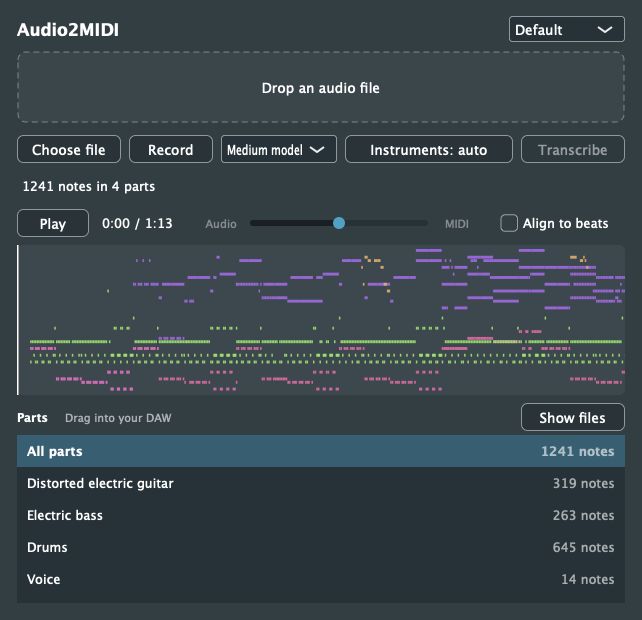
Drop, transcribe, listen, drag. The parts list shows every detected instrument with its note count. Drag a row into your arrangement, or open the MIDI files with Show files.
Cloud transcription bills by the second of audio. Audio2MIDI runs the model on your own computer, so a 3-minute demo and a 3-hour session cost the same: nothing.
Cloud figures use Mirelo's published rate of 2.5 credits per audio second and its free plan of 5,000 credits per month, checked November 9, 2026. Paid plans not shown. Rates may change.
No balance to top up and no monthly cap. Transcribe as long as your machine has power and disk.
The plugin talks to the engine on 127.0.0.1. Unreleased tracks never leave your computer.
After the first download of the engine and weights, transcription needs no internet connection.
No Audio2MIDI login. A free Hugging Face account unlocks the model weights once.
About 0.4 GB extra download. Good for quick sketches.
About 2 GB with PyTorch on the first run.
About 5.5 GB. Slower, and needs more memory.
Drop a finished song. Guitar, bass, drums, voice and more come back as separate MIDI files, plus one file with every part.
Every MIDI file carries the detected tempo and meter, so parts snap into the arrangement instead of drifting.
Snap every note to the detected beat grid, or leave it off to keep the performance exactly as played.
Preview through the track: one slider mixes the original audio with the MIDI. Click the piano roll to jump.
The transcription is stored in the plugin state. Reopen the session and your parts are still there.
No bounce needed. Press Record, play the track in your DAW, and transcribe the take.
Mirelo makes a great cloud plugin, and co-released the open MuScriptor model that Audio2MIDI runs. The difference is where the work happens and who pays for it.
| Aspect | Audio2MIDI | Mirelo Audio-to-MIDI plugin |
|---|---|---|
| Cost | Free download and local transcription. No subscription, no credits. | Free download. Transcription uses account credits. |
| Usage allowance | No credit balance or monthly quota. Limited by your hardware. | 2.5 credits per audio second. Free plan: 5,000 credits/month (about 33 minutes). |
| Processing | Local, on your computer | Cloud, on Mirelo's servers |
| Audio upload | No audio sent to a cloud service | Audio uploaded for transcription |
| Internet | Only for the first dependency and model downloads | Required for transcription |
| Account | No Audio2MIDI account. Free Hugging Face account for model access. | Mirelo account required |
| Plugin source | Open source, AGPL-3.0 | Commercial product |
| DAW workflow | File drop or recording, full mixes, per-instrument and combined MIDI | File drop or recording, full mixes, per-instrument and combined MIDI |
| Model | Open MuScriptor research model | Audio-to-MIDI Pro production model |
Checked November 9, 2026 against Mirelo's plugin announcement and FAQ, model overview and the MuScriptor model card. Free does not mean unrestricted: the MuScriptor weights are CC BY-NC 4.0 (non-commercial), and we don't claim the accuracy of Mirelo's production model.
uvx hf auth login.pkg. It is not notarized, so allow it once under System Settings → Privacy & Security → Open Anyway. No admin password needed.Yes. The plugin is free and open source under AGPL-3.0, and transcription runs on your own computer, so there are no credits, plans or per-song fees. You supply the hardware, disk space and electricity.
The plugin code is AGPL-3.0. The MuScriptor model weights are licensed CC BY-NC 4.0, which is a non-commercial licence. Read the licence on Hugging Face and decide for your use case before you rely on it commercially.
No. The plugin talks to the engine on 127.0.0.1:8722, on your machine. The internet is only needed once, to download the Python environment and the model weights.
We don't claim that. Audio2MIDI uses the open MuScriptor research model. Mirelo's cloud product uses its own production model. Try it on your material: it costs nothing.
The model weights are gated. Accept the licence on the MuScriptor model page once, run uvx hf auth login, and the plugin downloads the weights on the first transcription.
Any macOS host that loads VST3 or Audio Units, such as Ableton Live, Logic Pro or FL Studio. There is also a standalone app. There is no AAX version, so Pro Tools is not supported.
It builds from source but is untested. On Windows the engine runs PyTorch on the CPU, the MIDI preview is silent, and the engine can outlive a crashed DAW.
The release is not signed or notarized. Open System Settings, Privacy & Security, and click Open Anyway once. The installer needs no administrator password and installs into your user Library.
Free, local and open source. Your songs, your machine, your MIDI.